Product tables for B2B ecommerce: how to make ordering fast for repeat buyers
A lot of B2B ecommerce sites still push buyers through individual product pages, one by one. That might work if someone buys a single item. It breaks down the moment a buyer needs 30 or 50 different products with multiple variants and technical details.
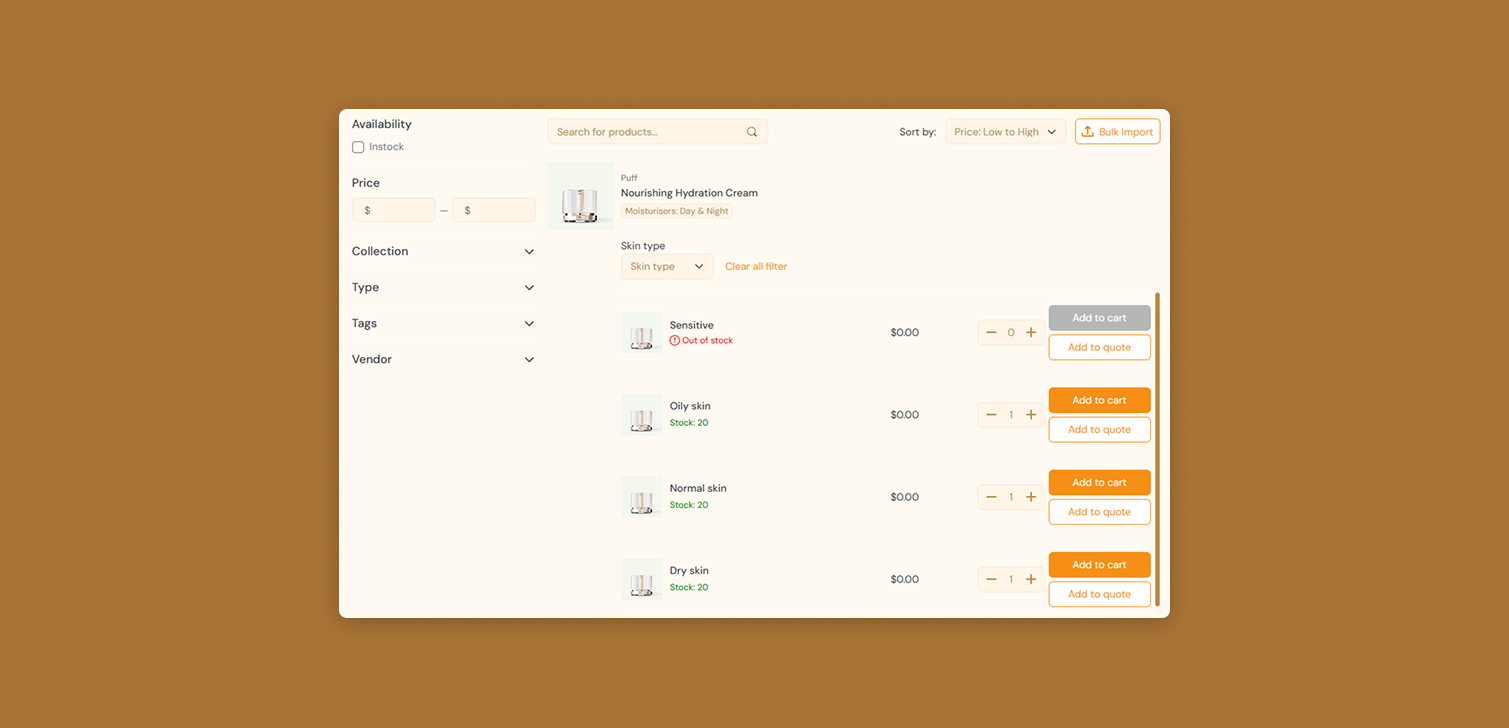
A product table solves this. It gives users a single page where they can:
View many products and variants at once
Scan technical attributes and compare options
Add multiple items and quantities directly to the cart
For repeat customers, this is the difference between a 5 minute reorder and a 30 minute chore.
Why product tables matter for B2B ecommerce
B2B purchasing behavior is different from B2C. Buyers are often:
Ordering for a company, not for themselves
Reordering similar sets of products every week or month
Working from a parts list, SKU list, or technical spec sheet
In that context, a classic grid of "card" products is not enough. It looks nice, but it does not match how these users think.
A product table fits better because it supports:
High volume orders. Users can add many items in one pass, with control over quantity.
Attribute comparison. Columns show dimensions, materials, voltages, capacities, or other technical details.
Pattern-based selection. Buyers can sort, filter, and scan for the exact combination they need.
Imagine a maintenance manager ordering 50 different spare parts. Opening 50 product pages, adding each to cart, then going back is friction. A table lets them work more like they would in a spreadsheet or internal system.
Key elements of an effective product table
A useful B2B product table is not just any table. Certain elements matter a lot.
A real table layout, not a grid Use columns and rows for all products and variants. Each row should represent a specific product or variant. Columns should show the key attributes. This structure makes it easy to scan, sort, and compare - as long as you handle multiple product options visibilty well.
Table-specific search bar Add a search input that filters only the table rows, not a global site search. When users type into it, the table should update in place. This helps when buyers know part numbers, codes, or specific words from the spec.
Visible filters at the top B2B users will almost always filter. Typical examples:
Brand or manufacturer
Technical ranges (voltage, size, capacity)
Availability or lead time
Place filters (including well-designed visual ones) at the top of the table and keep them visible while scrolling. Hiding filters in accordions or sidebars slows people down.
Sorting on technical characteristics Sorting only by name or price is rarely enough. Allow sorting by key technical fields, for example:
Wattage
Pressure rating
Length or diameter
Buyers often think in ranges or thresholds. Sorting lets them move from "I need something around this spec" to the exact variant that fits.
Row-level add to cart with quantity selector Every row needs:
A quantity input
An "Add to cart" or similar action
It should add to cart immediately, and surface errors properly.
Pagination with larger page sizes B2B users are usually fine with long tables. Offer options like 25, 50, 100 rows per page. Do not worry if loading 100 rows adds a small delay. The gain in efficiency for the user is worth an extra fraction of a second.
Horizontal scrolling with a sticky first column If you have many attributes, the table will scroll horizontally. That is fine. Just keep the first column fixed in place. That column should contain:
A small product thumbnail
The product name or short label
This lets users scroll through attributes and still know which product they are looking at.
Compact font size with a user switch A smaller font (even 12px) lets you display more data on screen. For dense B2B catalogs, this is often useful. To keep it accessible:
Default to a compact size
Offer a simple toggle for "normal" or "large" text
That way, power users get the density they want, and others can adjust.
Links to product pages without losing table state
Some users will want the full product detail page. That is fine, as long as:
Clicking back returns them to the same table state (page, filters, scroll position).
Or, even better, the product page opens in a popup or side panel so the table remains in the background.
This preserves context. Users can check more information, then continue adding items without starting over.

Handling mobile and small screens
Most B2B traffic still comes from desktop, which is where tables work best. But mobile cannot be ignored.
On mobile, classic tables often break. Columns get cramped, or the user has to scroll sideways too much. In that case, a grid or stacked card layout might work better.
If you switch to a grid on mobile, try to keep:
Key attributes visible, not just image, title, and price
Clear access to quantity selectors and add to cart
Simple filters and sorting at the top
The goal is not to show every spec on mobile. It is to keep the main purchasing actions possible, even if the buyer later returns on desktop to finalize a large order.
Where product tables are especially useful
Product tables tend to shine in certain categories:
Industrial parts and components
Electrical and electronic products
Construction materials and hardware
Laboratory supplies
Wholesale packaging or consumables
Anywhere buyers work from long lists, part numbers, or technical sheets, a good table becomes a core part of the buying experience.
FAQ
Do all B2B stores need a product table? No. If you sell a small number of simple products, a standard grid or catalog might be enough. Product tables matter most when customers order many items or need to compare technical attributes.
How many columns are too many? There is no fixed number. Start with the fields buyers actually use to decide: 4 to 8 key attributes plus name and price is common. Extra data can sit behind tooltips or a "more details" view.
What if my customers mostly order on mobile? You can still use tables on desktop for power users and fall back to a grid on mobile. Just make sure both layouts support adding multiple items and viewing the most important specs.
Is a product table only for logged in customers? Not necessarily. Many stores show the table to everyone, but hide prices or quantity inputs until login. This depends on your pricing model and how strict you are with access control.
How hard is it to implement a table like this? Technically, it is relatively straightforward, especially if your platform already supports product lists, filters, and sorting. The real work is deciding which attributes to show and testing the layout with real buyers.
Wrapping up
A well built product table is one of the most useful tools you can add to a B2B ecommerce site. It matches how professional buyers already work, helps them place large and complex orders with confidence, and reduces friction for repeat purchases.
If your customers regularly buy many products at once or rely on technical specs, a product table is not a nice extra. It is part of the core buying experience.